Project Description
This project examined how Quercus, the University of Toronto’s learning management system, inadequately supports student collaboration despite the growing reliance on group-based coursework. While Quercus enables group formation and submissions, its limited communication and coordination tools force students to rely on external platforms such as Google Apps or Discord, fragmenting workflows and increasing friction in group work.
Using a user-centered, inductive research approach, we conducted secondary research, surveys, and semi-structured interviews with UofT students to understand real collaboration practices and pain points. Insights were synthesized through affinity mapping and descriptive analysis, leading to the creation of personas, empathy maps, as-is scenarios, and needs statements.
The project aimed to identify design opportunities that better integrate online and in-person collaboration within Quercus, improving coordination, communication, and the overall group work experience
Developed For
Faculty of Information, University of Toronto
INF352 Information Design Studio II: How to Design
Professor. Olivier St-Cyr
Team members
Anastasiia Lemish
Jeremy Kevis
Mandy Tu
Mai Nguyen
Scarlett Ma
Understanding Student Digital Collaboration Tools at the University of Toronto

Primary Research
Methods
Quantitative
Online Survey
Distributed via UofT student social channels (Discord, Instagram)
Screened for current UofT enrollment
Included 14 multiple-choice questions and 2 open-ended questions
Participation was voluntary and anonymous
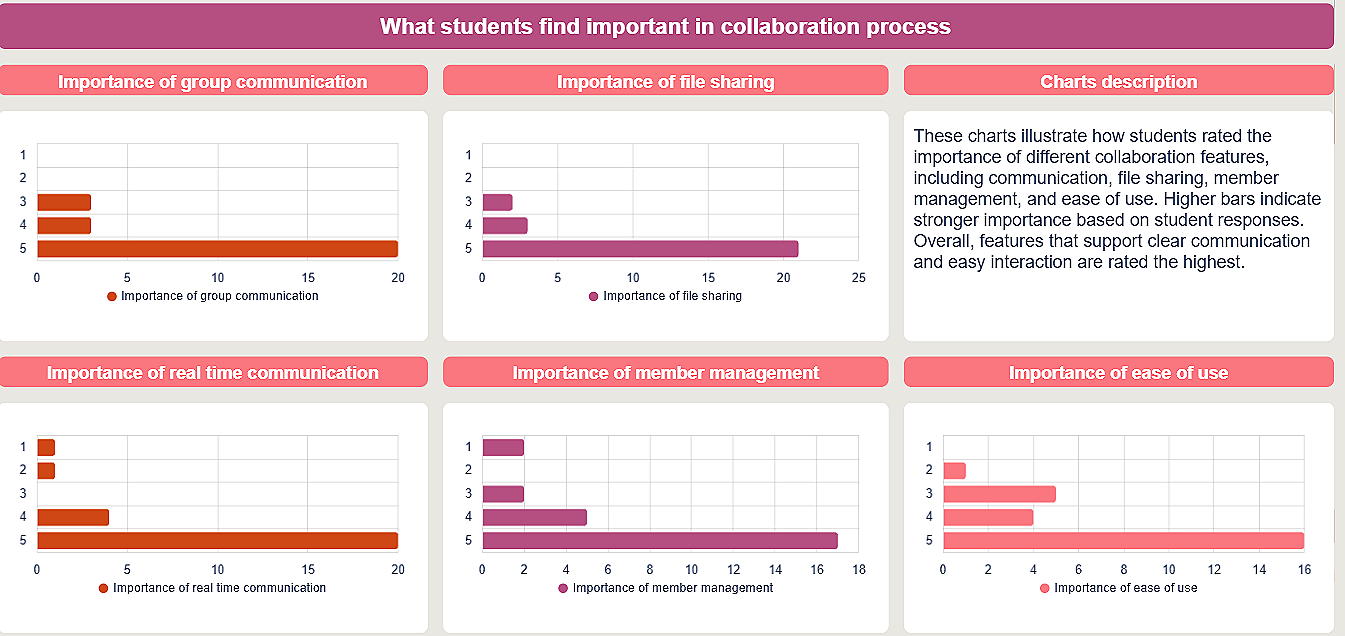
Survey Data
26 responses cleaned and summarized in Excel using pivot tables
Visualized key metrics (satisfaction, engagement, feature priorities) in Smartsheet dashboards
Quantitative results highlighted low-to-neutral satisfaction with Quercus and high reliance on external tools (Discord, Google Apps)
Data Analysis
Qualitative
Semi-Structured Interviews
Conducted in-person on campus with verbal consent
Followed a prepared guide with 10 primary questions and optional follow-ups
Sessions lasted 5–10 minutes
Captured insights into students’ attitudes, challenges, and preferences for group work
Interview Data
14 interviews transcribed using Zoom, Word, or manual notes
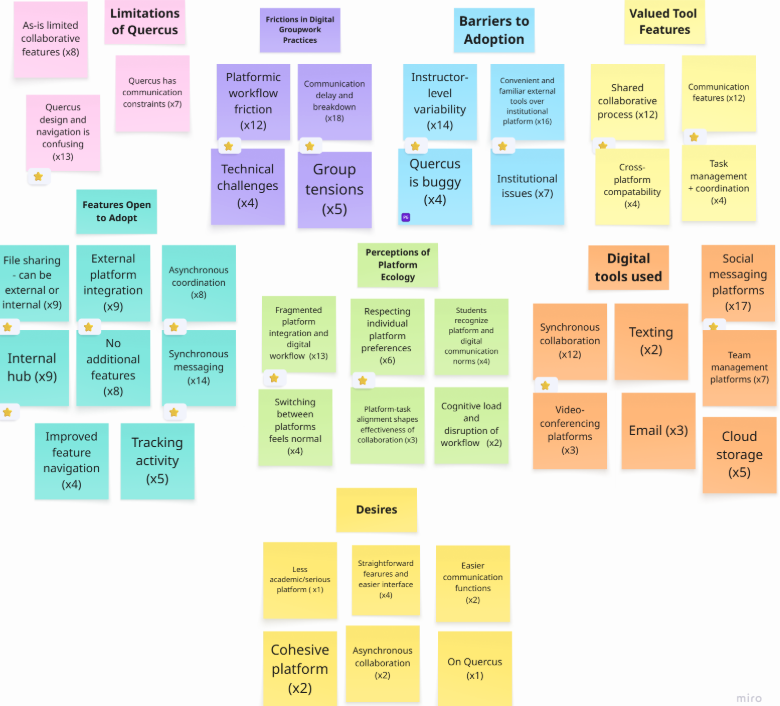
Organized and coded in Miro using an inductive approach
Key themes included communication needs, coordination challenges, and workflow fragmentation
Combined with open-ended survey responses to enrich qualitative insights
Key Findings
Students rely on multiple external tools (Google Apps, WhatsApp, Instagram) to manage group work.
Using multiple platforms increases flexibility but fragments workflows.
Fragmentation leads to missed messages, duplicate files, and uneven participation.
Quercus is seen as adequate for coursework administration, not collaboration.
Most students prefer external tools despite the added coordination effort.
There is a clear need for an integrated collaboration tool that prioritizes efficiency, clarity, and flexibility
User Understanding
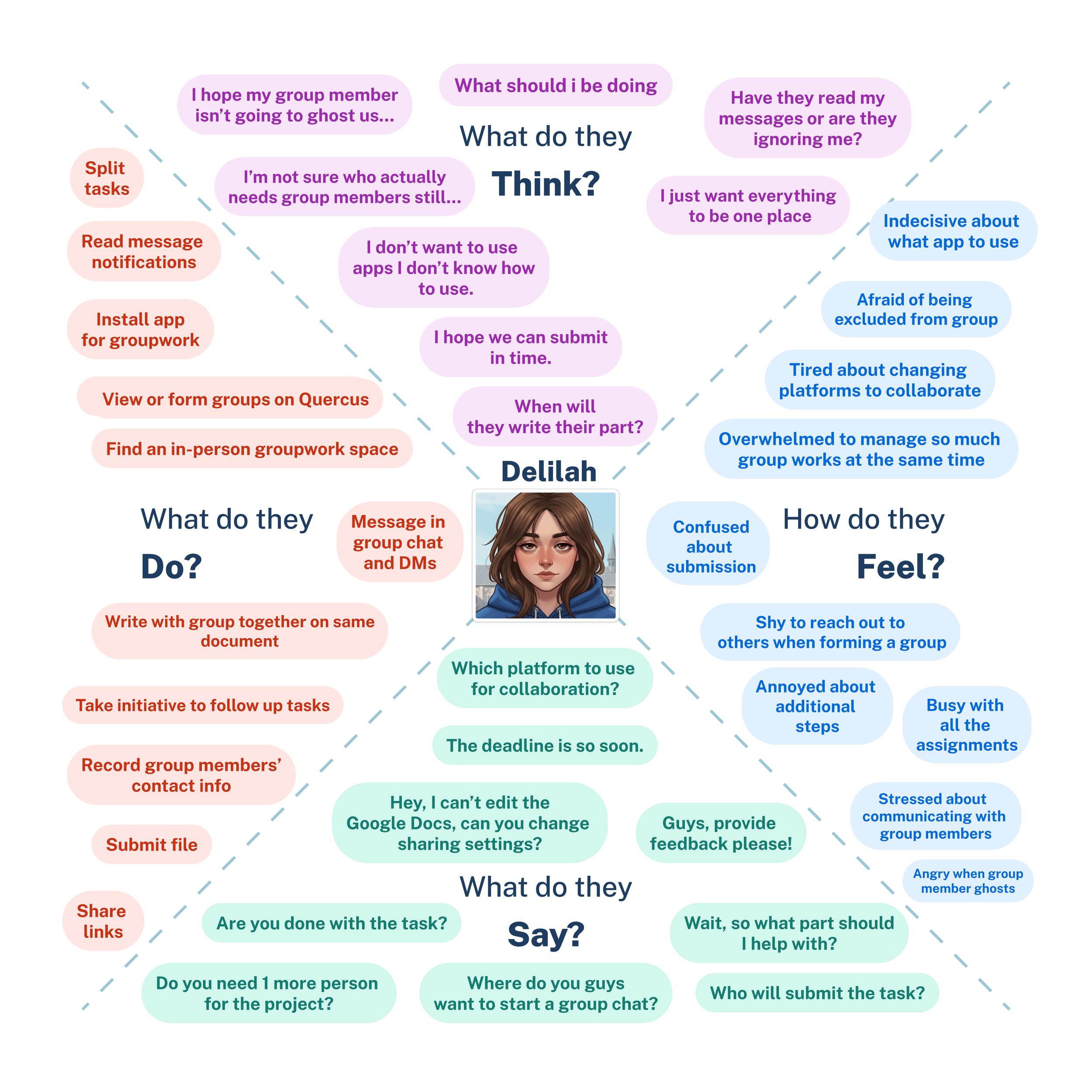
Empathy Map
Persona
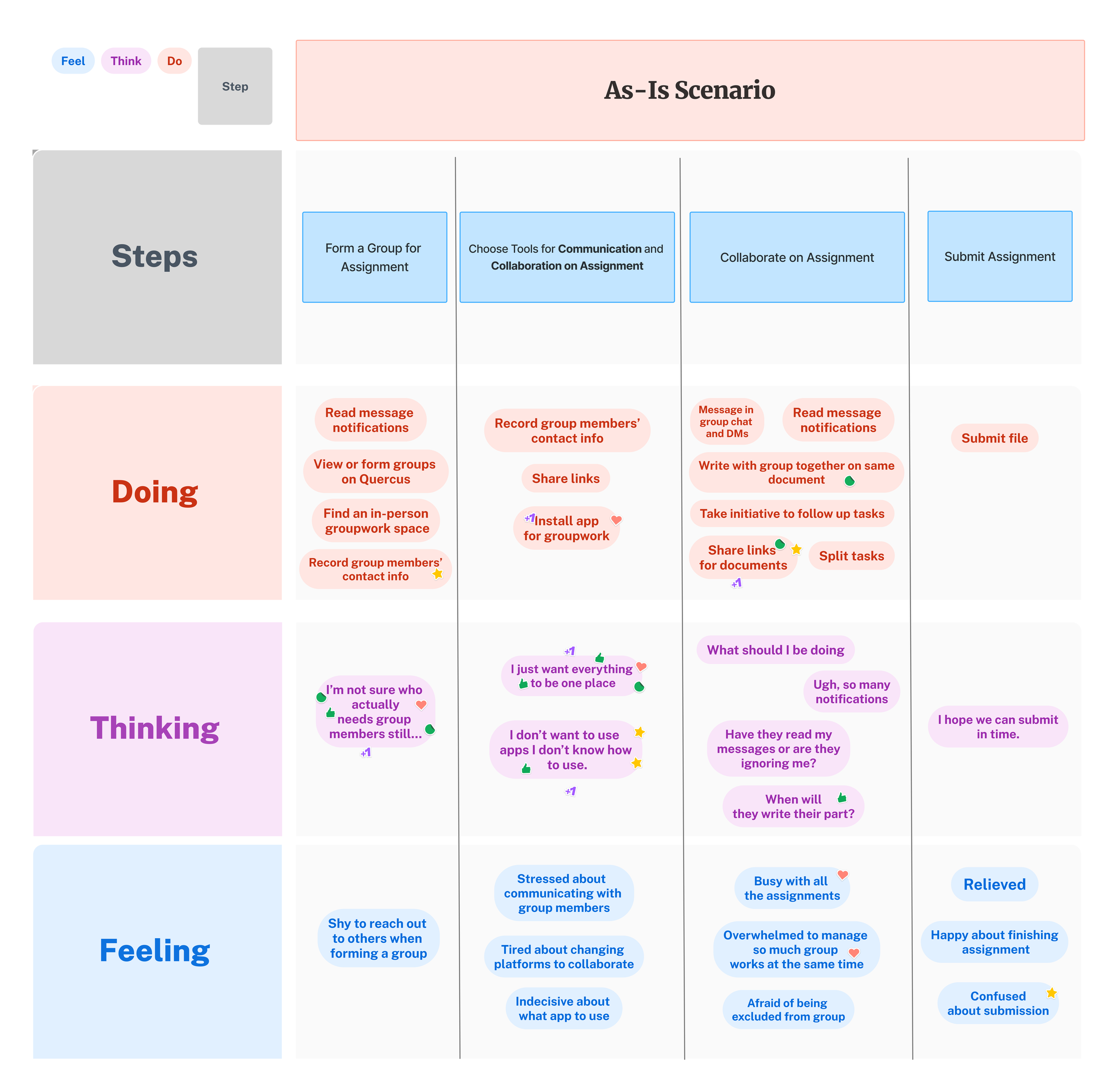
As-Is Scenario
Need Statements
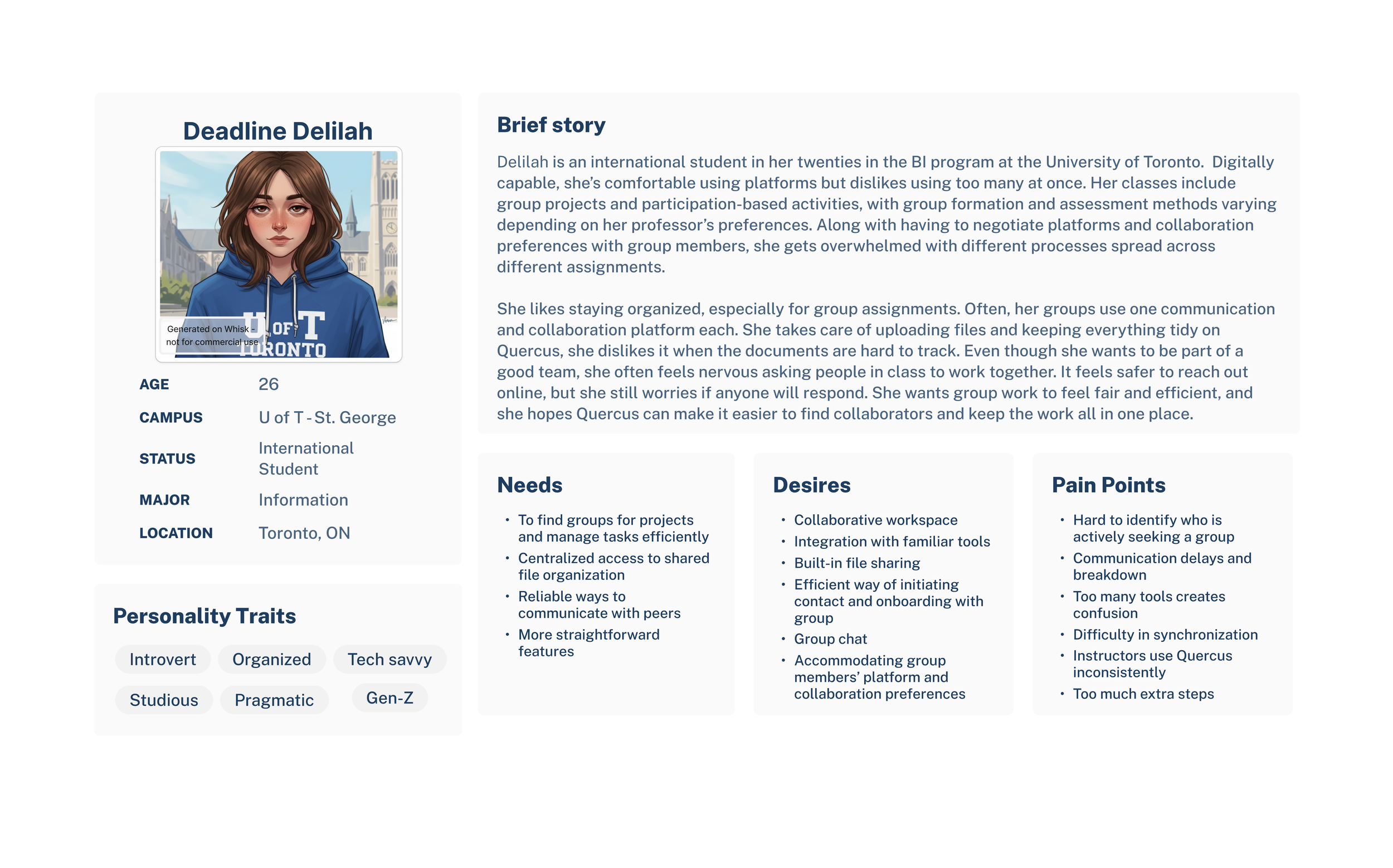
Deadline Delilah needs a way to see which groups need members so that she wouldn’t feel anxious finding group members.
Deadline Delilah needs a way to install apps and use them consistently so that she uses her time and gadget memory effectively.
Deadline Delilah needs a way to keep her group work organized so that she isn’t overwhelmed losing track of shared files.
Deadline Delilah needs a way to select the right tools so that no one in her group is forced to use unfamiliar apps.
Deadline Delilah needs a way to share and access documents on Quercus so that everything is in one place.
Ideation
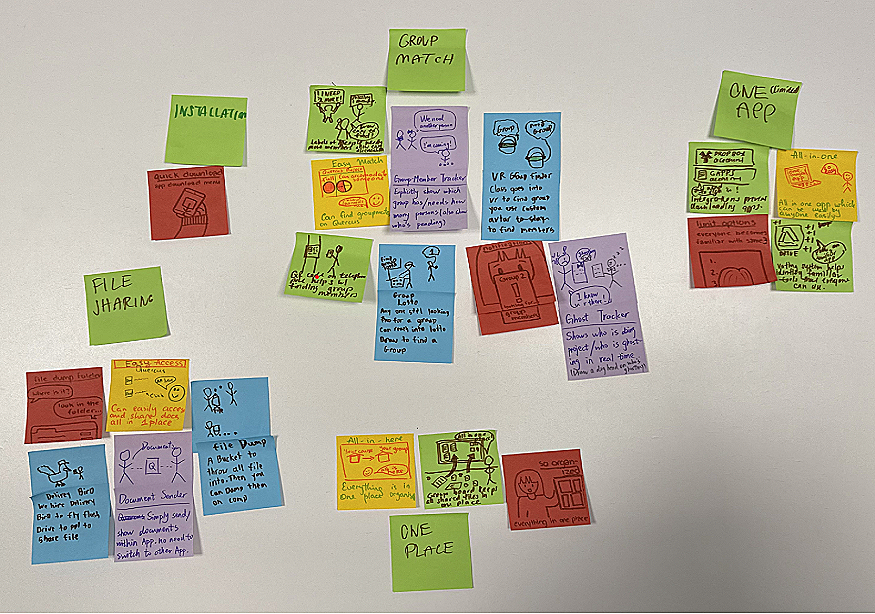
Stick Storm Idea Summary
Group Matching – Ideas in this cluster focused on helping users efficiently find compatible group members, such as suggestions based on availability, skill sets, or interests.
Unified App – This cluster included concepts for consolidating multiple collaboration tools into a single platform, reducing the need to switch between apps for different tasksю
Installation – Ideas here address simplifying setup processes and ensuring that all users can quickly access and use the system without technical barriers.
File Sharing – This cluster provided solutions for seamless, secure sharing of documents and resources among group members, including version control and real-time updates.
Centralized Workspace (“One Place”) – These ideas envisioned a single hub where all group activities—chat, files, schedules, and task tracking – could be managed, providing clarity and reducing scattered workflows.
Prioritization
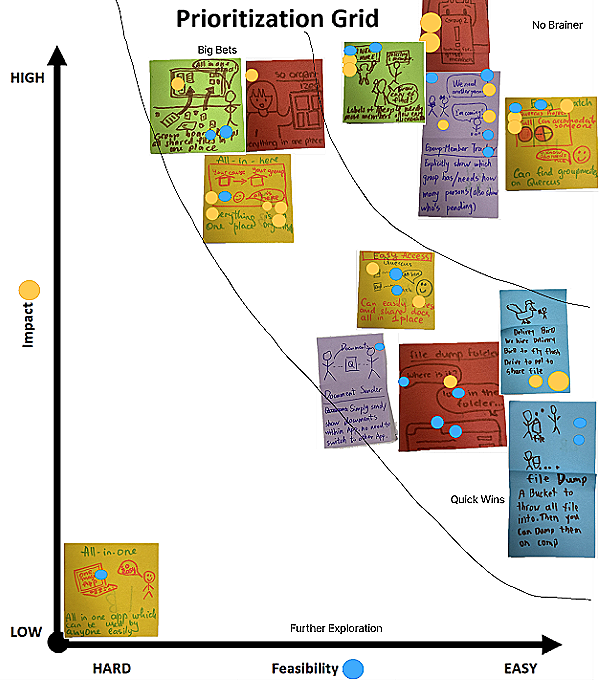
No Brainers: Ideas like Group-Member Tracker and Needing-People Label ranked high in feasibility and directly addressed group formation pain points, making them strong candidates for immediate iteration.
Big Bet: All-in-here / So Organized scored high in impact but lower in feasibility, representing a high-value concept focused on centralizing collaboration and file access.
Quick Win: File Dump ranked high in feasibility with moderate impact, offering a simple, centralized file-sharing solution.
Further Exploration: All-in-one concepts scored low in both impact and feasibility and were deprioritized due to scope and technical complexity.
Outcome: The team prioritized No Brainers, Big Bets, and Quick Wins, with a focus on group finding and centralized file management.
Low-Fidelity Prototype
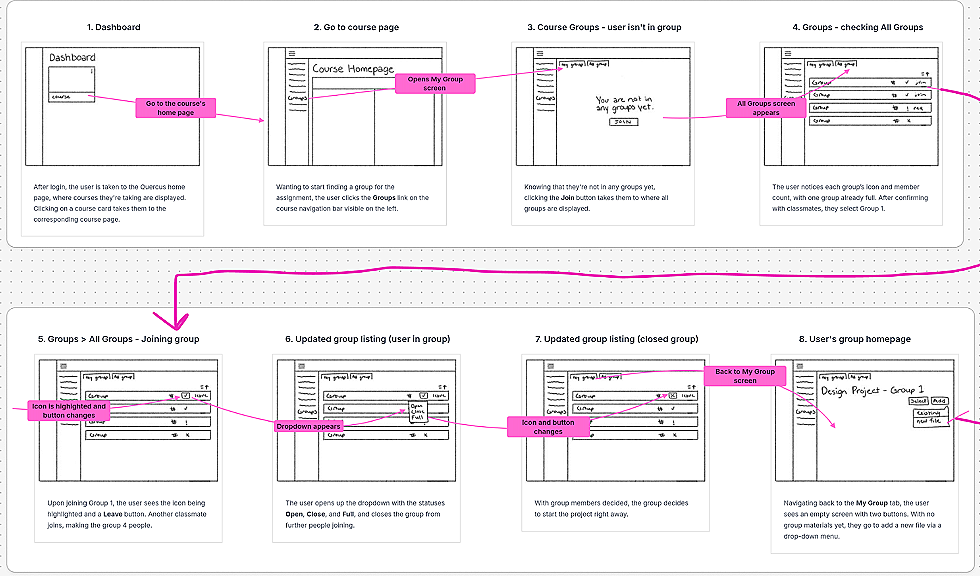
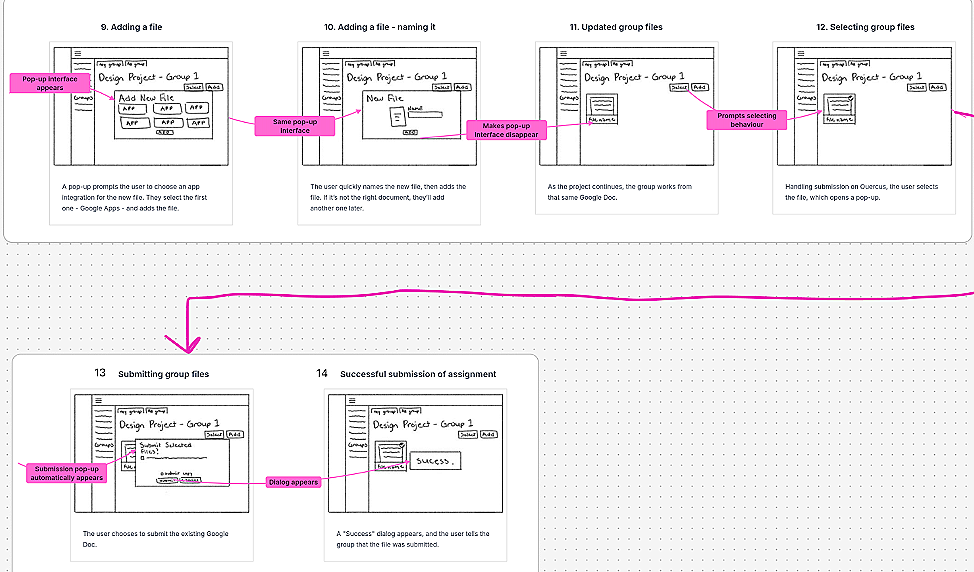
Low-Fidelity
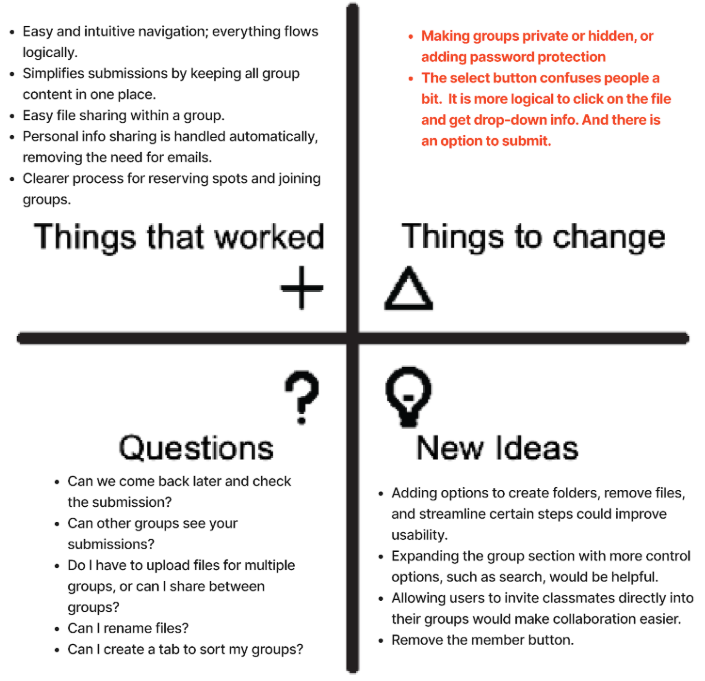
Prototype Testing
Key Improvements from Low-Fidelity Feedback
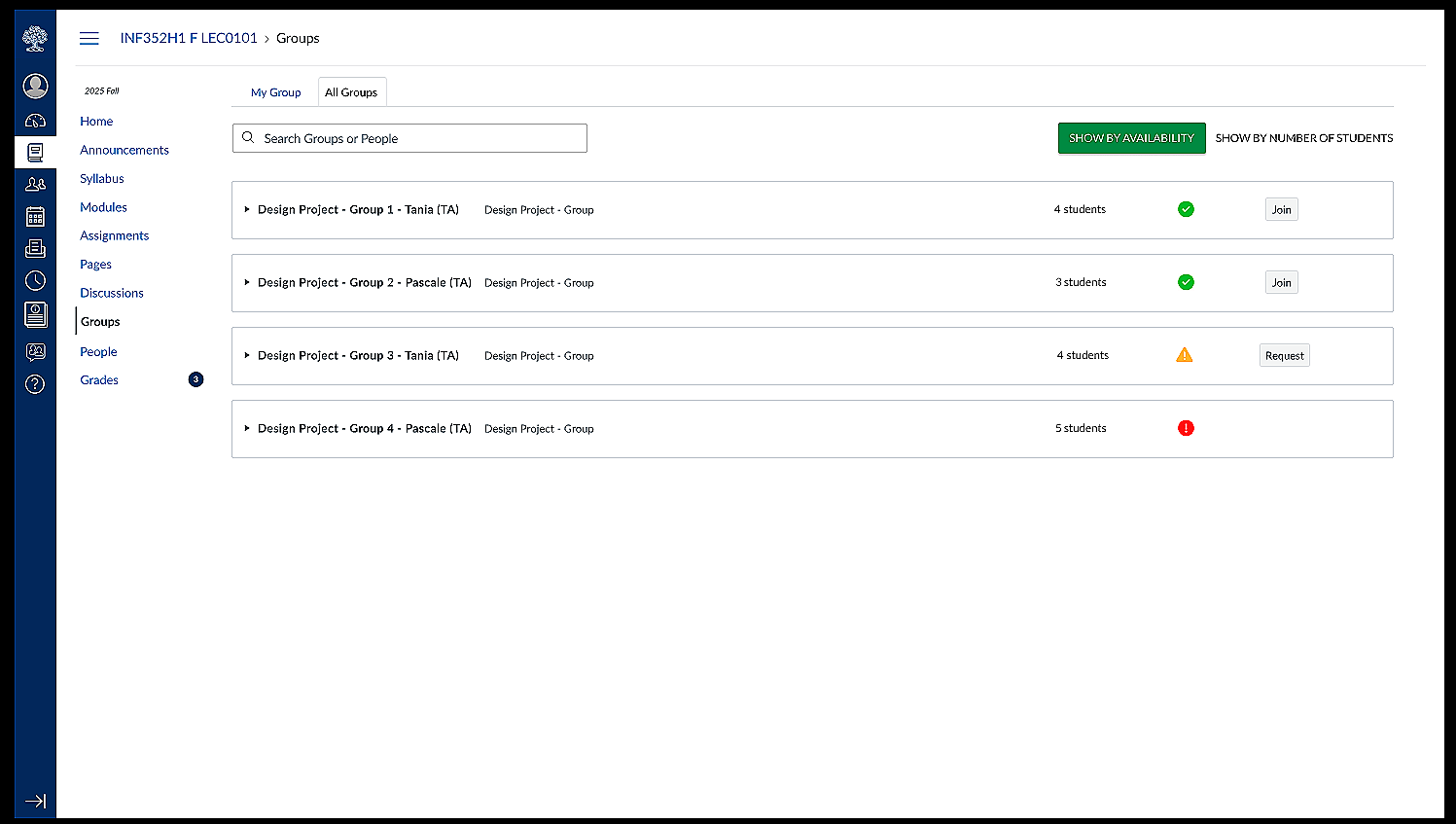
Clearer Group Status: Added hover tooltips indicating whether groups are open, closed, or complete to reduce uncertainty around availability.
Direct Group Browsing: Introduced an “All Groups” entry in the top navigation, allowing users to browse and join groups without navigating through “My Group.”
Simplified Navigation Flow: Enabled direct access to the navigation menu from the left-side icon, removing unnecessary extra clicks.
User-Driven Changes: Updates were based directly on participant feedback highlighting confusion and friction in navigation.
Outcome: Improvements increased clarity, efficiency, and overall ease of use in the medium-fidelity prototype.
Highlights of Clickable Medium-Fidelity Prototype
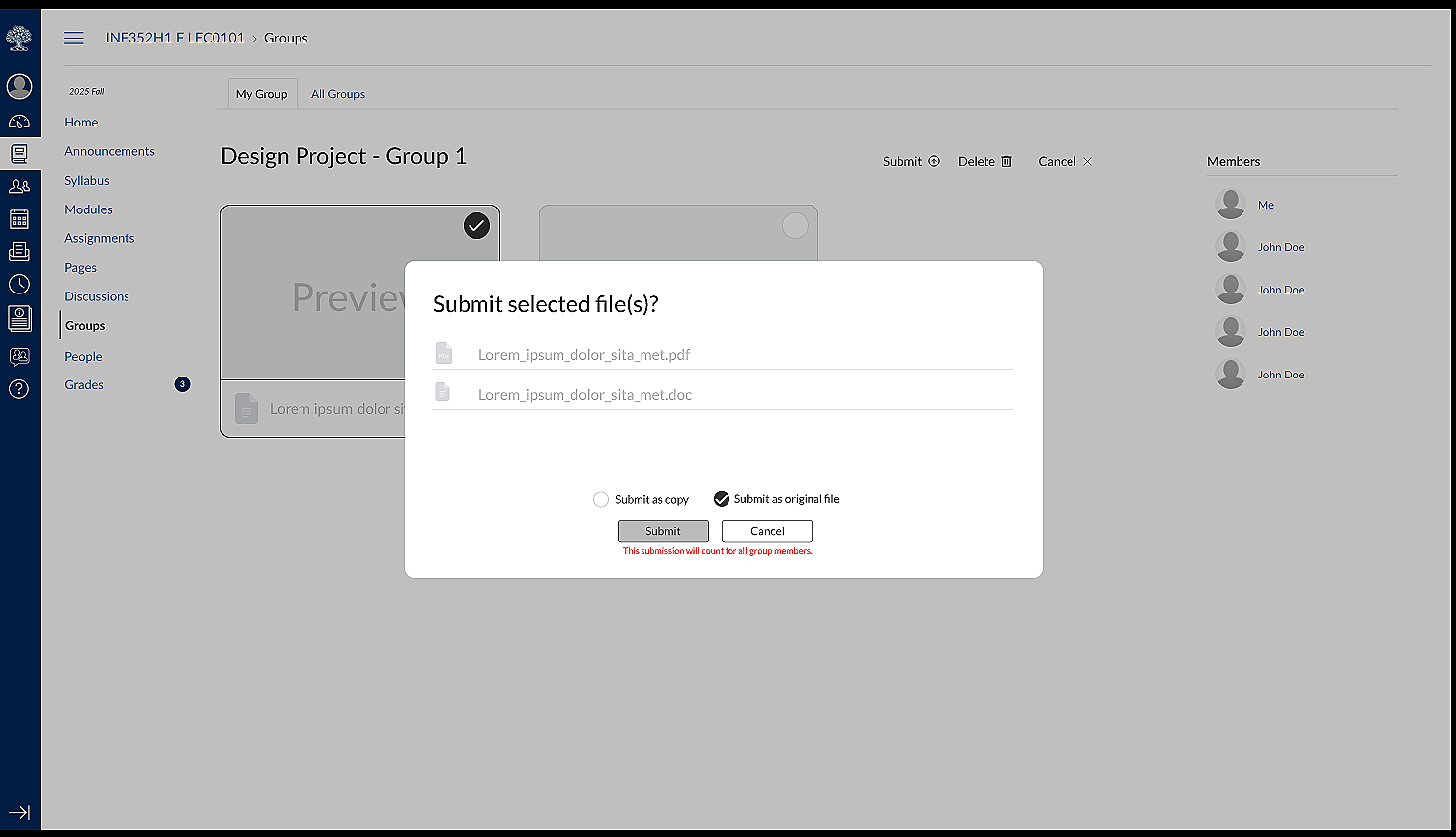
File Submission Prototype
Group Joining Prototype
Pain Points in user Testing
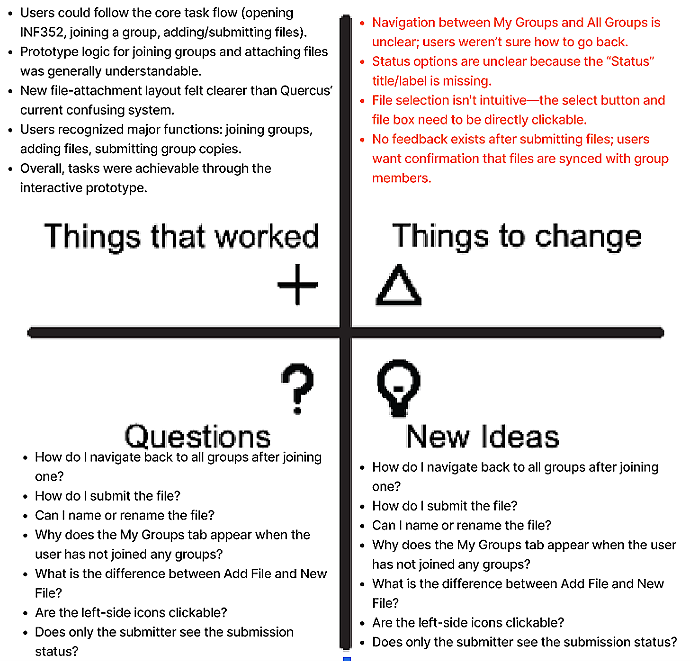
Users understood the core group tasks but encountered confusion due to unclear navigation and weak visual affordances.
Navigation between “My Groups” and “All Groups” was unintuitive, making it difficult to return to group listings after joining.
The submission process lacked clarity, with participants struggling to locate and recognize the Submit action.
File upload interactions were counterintuitive; users expected direct interaction with files rather than a separate “Select” control.
Missing interface cues (section titles, deadlines, clear distinctions between actions) reduced confidence and comprehension.
Lack of visible feedback and status indicators left users unsure whether submissions were successful or shared with the group
Medium Fidelity Prototype Testing
Key Takeaway
Overall, users want clearer navigation, more intuitive file interactions, and stronger feedback and labels to support understanding of their status, submissions, and group membership. At the same time, participants completed the main workflow and found the prototype's core structure understandable. They recognized the improvements over the current Quercus system - particularly the cleaner layout and clearer logic for joining groups and managing files - which suggests a strong foundation to build on as the design is refined.